 v.7
v.7
Make sure your connection is secure ("httpS:" instead of just "http:"). Click the logo above for a secure connection.
v.7
Make sure your connection is secure ("httpS:" instead of just "http:"). Click the logo above for a secure connection.
Published on: 02/09/2026, 05:50 PM by Software Developer
Once you have saved the CMSbyCW.zip file on your computer,
1) Go to your Desktop's Files Explorer, and go to the folder where you saved
CMSbyCW.zip
2) Hover your mouse to the file CMSbyCW.zip and then
3) Right-click on your mouse, so the other submenus display, like so:
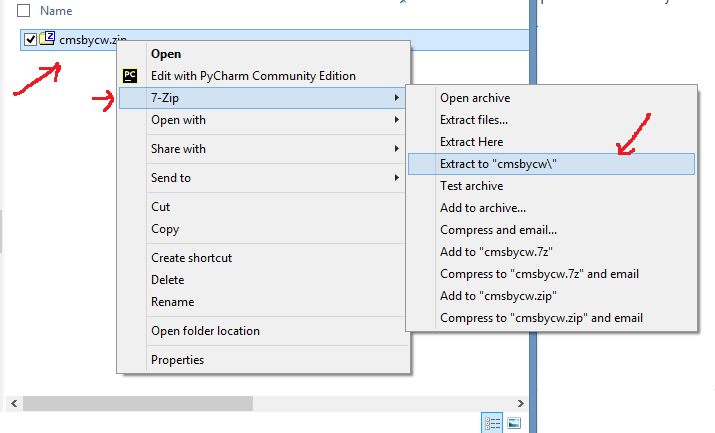
4) Programs like 7-Zip is a free opensource software, but most computers now have a built-in zip file extractors. You can also check out 7-ZIp here (we are not affiliated with them, we just use their software also).
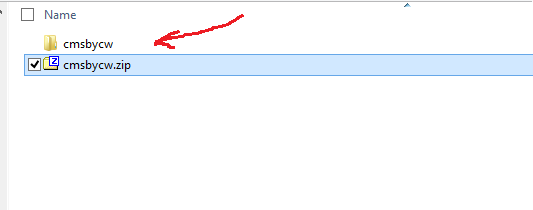
So for this example, once you click the "extract to "cmsbycw\" all the files inside cmsbycw.zip, will be extracted to that new folder. Now you have the extracted software package on its own /cmsbycw/ folder, like in the screenshot below:
How to Upload an Unzipped Package Using FileZilla via FTP
Or go to the Help Page for other Documentation or Tutorials:
Thank you for visiting our website!