v.7
v.7
Make sure your connection is secure ("httpS:" instead of just "http:"). Click the logo above for a secure connection.
v.7
Make sure your connection is secure ("httpS:" instead of just "http:"). Click the logo above for a secure connection.
Published on: 02/21/2026, 03:14 PM by Software Developer
My original intent building this is to make it useful for me.
1) To be able to Add Blog Posts, so I can blog about stuff like this to unclog my brain...
2) And then also to Add Web Pages, for important Pages (some mandatory) like:
| POLICIES: Terms | Privacy | Disclosures | Comments | Feedback | DMCA | No Refunds |
And I just finished addiing the No Refunds Policy Page yesterday, after finishing the Blog Post
Took four days of back and forth, revising, thinking, and over-thinking.
Changed Status from "Draft" to "Published" ... clicked that blue "Update Post" button.
Done.
I went back to old blog posts, using my phone, and clicked around, noticed that on the Comments and Contacts forms, the "I agree to Terms and Privacy policies" didn't open to a separate window.
Oops, forgot to add the
target="_blank"
on those links.
Why is that important?
Well, if you are typing a comment on the comment box, and then want to check out what those Terms and Privacy pages say, if you don't add that code to the link itself, the page will open on the same window.
And there goes whatever you are typing on the comment box.
You can hit the browser's "back" button.
Or you can just add that code above, so that that link will open on a new tab or new window.
It's for User Experience - UIX.
Make it easy.
I digressed.
3) Contact Form
- So I also added a Bonus Code for the Sample Contact Form
4) Comment Form
- So I also added a Bonus Code for the Sample Comment Form
5) Share Code
- I added a Bonus Share Code . The code still works as is, after 10+ years.
6) Search Functionality
- I built it to be able to crawl and search blog Posts. (You don't want it searching private Pages like login Pages and such)
7) Landing Page ready ....
I wrote a tutorial on how to hide the header:
How to Hide the Blog Title and Header
... I used HTML for the marketing and sales page, it was basically what is inside the "About" page, the only difference is, it's in HTML, which gave me more room to truly display the landing page as I designed it (so basically, I used my initial one pager CW Simple Site design)
.... then I thought, I should put that in a separate CMSbyCW Page instead ... so we can see what we can do with CMSbyCW - because it has its own design components, and limitations, like the contents of all that "noisy design".should be put in the <container > div.
... then I thought, yes, I won't mix and match CW SImple Site with CMSbyCW, I'll put everything CMSbyCW, INSIDE it.
... I thought it would be a good showcase as well,.
... so the former index.html, is now in the About web Page.
... I added a link on the header, I replaced "Dashboard" with "About"
Why the change? Because the index.html, as it was, more or less focused on the CMS, what it took to build it, etc. It's done now.
(You can click the image to view a bigger version - will open in a new window)
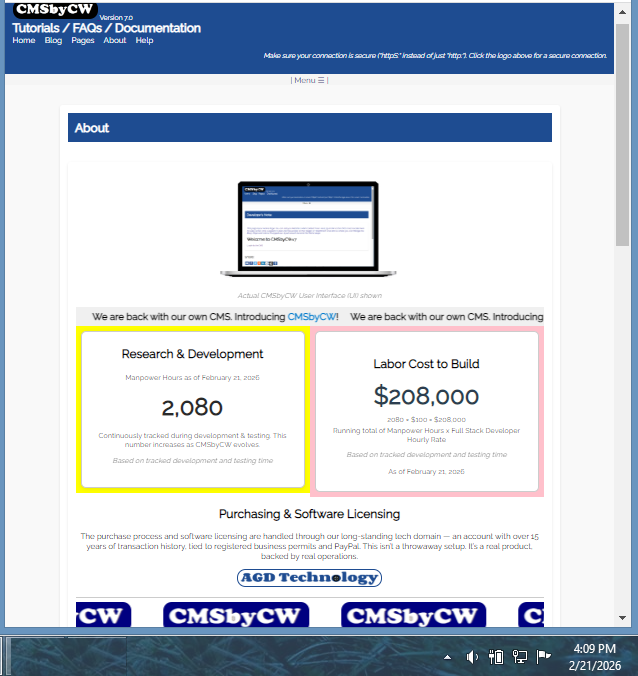
So the next season is, who else can use it? Who else can be helped with it?
So other New Users can see what can be done and how the CMS can be expanded to do other things.
Let me take a screenshot of the CMS home page, as of today 02/21/2026 - because Home Pages almost always, get revised.
(You can click the image to view a bigger version - will open in a new window)

Then I thought about what else - what other Bonus Codes I would include in the Package.
Developer's note: One day later:
Update to this blog post ---- > I wrote a "formal" FEATURES page.
I added more Bonus Codes (that was what the "We'll see" above is all about), I also use ALL of these codes which are showcased here on the website.
NOTE: To edit or copy these Bonus codes to a new Post or Page, you have to log in first - you can find these codes in Dashboard > Manage Pages.
NOTE: To edit or copy these Bonus codes to a new Post or Page, you have to log in first - you can find these codes in Dashboard > Manage Pages.
01 - Test Page (Status: "Published" page sample)
02 - Test Page (Status: "Draft" page sample)
03 - Sample Contact Form (follow instructions to change your Admin email address on the form)
04 - Sample Comment Form (follow instructions to change your Admin email address on the form)
05 - Sample Code - 4 Columns --> Use Case in: About
06 - Sample Code - 3 Columns --> Use Cases in: About, 150+ images on one page,
07 - Sample Code - 2 Columns --> Use Case in: About
08 - Sample Code: Animated Counter --> Use Case in: About
09 - Sample Scrolling Text Code --> Use Cases in: About , Carousel Slideshow
10 - Sample Scrolling Logos Code --> Use Case in: About
11 - Sample Countdown Timer --> Use Case in: About
13 - Sample Audio Playlist Code --> Use Case in: Audio Gospels Playlist
14 - Sample Video Playlist Code
15 - Sample Carousel Slideshow Code --> Use Case: Carousel Slideshow
I believe all of these Sample Codes put together in CMSbyCW would be worth the price. :-)
Join the CMSbyCW Waitlist — Request Early Access
Early access users help shape final features, pricing, and rollout.
NOTE: Before purchasing, please review our Help / Documentatiion Page (software requirements), Demo Page (link will open in a new window) and No Refunds Policy. This ensures CMSbyCW is the right fit for your needs. All sales are final.
Digital software, priced for the value and independence it provides, delivered instantly.
========================================
Thank you for visiting our website!